• TEAM
  • WORK
  • PACKAGES
  • BLOG
Get In Touch
  • TEAM
  • WORK
  • PACKAGES
  • BLOG
  • GET IN TOUCH

There are millions of blogs, videos, and infographics on the internet, but just a fraction get the visibility they deserve.

Why? It all comes down to the art of promoting content.

You (or your content marketing agency) put in a lot of effort to create content, which is why it’s so important to pair content creation strategies with content promotion.

After all, you spend a lot of time cranking out great content for your target audience. Shouldn’t you get as many eyes on this content as possible?

In this guide, we’ll explain what content promotion is and why it’s so important. We’ll even share an easy playbook you can follow to boost your all-star content to internet fame.

What Is an Example of Promotional Content?

Let’s say you’re an eco-friendly kids’ clothing company, and you created informative video content about sustainable living. This piece of content might be a gem, but without the right content promotion strategies, it just won’t reach your target audience.

If you’ve invested hours into creating quality content and no one’s biting, you might just need to get the word out.

For example, you can promote your videos on social media platforms or use pay-per-click (PPC) ads to transform this video from “just another piece of content” to an asset that generates more business.

Why Is Content Promotion Important?

You can write the best content in the world, but people can’t check it out if they don’t know about it. Content development is a must-have, but content promotion is the best way to get more eyes on your content.

If you’re on the fence, content promotion can help you:

  • Engage the right audience: You aren’t creating content for everyone—you’re targeting a very specific audience. Creating a promotion strategy ensures you reach the right demographics, which leads to more engagement and conversions.
  • Boost organic traffic: Sharing content on various channels and investing in search engine optimization (SEO) increases organic traffic to your site, which doesn’t cost you a dime and puts your brand in front of more potential customers.
  • Squeeze life out of evergreen content: Some pieces of content are relevant all year round. Instead of letting content float into the void, a content promotion strategy ensures these established pieces of content get some love, too.

Content promotion isn’t a nice-to-have. If you’re going through the hard work of creating content—or hiring an SEO-focused content agency like MBE Group to do it for you—you owe it to yourself to promote that content after publishing. It’s the best way to create an effective digital marketing strategy that grows your business.

How Do You Promote Content Marketing?

So, we know how important promotion is, but how do you create a promotional strategy for your business? Follow these eight steps to get more mileage out of the content you worked so hard to create.

1. Create Valuable Content First

First things first, you need to double-check that your content is share-worthy. The more craveable your content, the easier it will be to promote it. In fact, creating engaging content that resonates with your audience encourages sharing, which makes your job a lot easier!

Before promoting a piece of content, be sure to:

  • Optimize it for SEO: Keyword research and on-page optimization are a must-have for showing up in search engines. This won’t generate organic traffic overnight, but SEO can certainly boost your chances of attracting more readers.
  • Add interactive elements: Text-based blogs are fine, but why not zhuzh things up a bit? Add interactive elements like quizzes, polls, and graphics to encourage people to share.
  • Include calls to action (CTAs): This doesn’t have to be anything big. It can be as small as adding a CTA at the bottom of your blog encouraging readers to sign up for your email list. Whatever you want them to do, make sure your audience always has a next step.

Creating quality content is a delicate art that requires a lot of research and finesse. Many businesses don’t have the resources to create their own content, which is where MBE Group comes in.

You focus on your customers and MBE Group’s team of SEO and content experts will help you create authoritative, high-quality content that turns heads. We recently helped a client go from 11,000 monthly sessions to over 65,000 sessions in just six months.

2. Identify the Right Channels

Quality content in hand, it’s time to find the right mix of promotional channels. This might sound obvious, but plenty of businesses struggle to share relevant content with their followers.

Look at your audience demographics or customer personas. Where does your target audience spend time online? Which platforms or content formats are their favorite?

Check that your channels and audience make sense for the content. For example, makeup tutorials might not perform as well on LinkedIn as they would on Instagram. The more naturally the content works with the channel, the better your chances are of building brand awareness.

Be sure to choose platforms where you feel comfortable sharing regularly. Consistency matters with your promotion efforts. After all, if you post just a few times a year, few people will follow your content.

3. Post on Social Media

Social media is one of the best (and cheapest!) ways to do content promotion. The right channels depend on your content, audience, and business, but these are some of the most popular social media channels:

  • Facebook
  • Instagram
  • LinkedIn
  • X (formerly Twitter)
  • TikTok

You don’t need to manually post content to each platform, either. Pre-schedule social media posts with tools like Buffer. Scheduling tools make it a cinch to bulk-upload posts for automatic social sharing.

4. Try Email Marketing

Email campaigns put your content in front of engaged list subscribers. Since people had to opt-in to join your email newsletter, they’re more likely to engage with your content.

Create a consistent email schedule promoting your content. Try sending emails to your list at least once a month, but make these messages as valuable as possible. Promote your content, but be sure to include juicy goodies like discounts or exclusive content to encourage engagement.

5. Do Influencer Outreach

Influencers and bloggers have a readymade audience that trusts their opinions. As long as you find an influencer who shares your target demographic, this is a great way to encourage more folks to check out your content.

Keep in mind that multimedia, like videos or social posts, is best for influencer marketing campaigns. However, the creators might want a hand in the content creation process so they can feel good about the content promotion.

Ask the influencer how they prefer to work with brands. Established influencers will have a proven process for boosting your brand.

6. Look Into Guest Blogging

Guest posts are a smart way to promote existing content. It doesn’t hurt that posting on another company’s website is also a prime backlink opportunity.

Find another complementary brand that has some overlap with your target audience—but that doesn’t directly compete with your business. For example, if you’re a purse brand, maybe you post a guest blog on a hair accessory website.

Both you and the guest posting site should cross-promote the content to generate as much organic traffic as possible.

7. Invest in Paid Advertising

This is the most expensive option, but paid ads will definitely put your content in front of more people. PPC like Facebook Ads and Google Ads will push your offers to people based on demographic targeting.

But this can get pricey, so try to create hyper-engaging content for your paid ad campaigns. Naturally engaging ad content tends to spread faster and has lower costs per click, which is great for your budget.

8. Repurpose Content

Did you film a pretty comprehensive YouTube video? Don’t just let it sit there—chop it up and repurpose it. Long-form videos can easily become:

  • Podcasts
  • Webinars
  • Infographics
  • Social media videos
  • Blogs (through the power of transcribing tools)

You can create several pieces of content from one original source piece. This gives you more content to share on your website, email campaigns, and social media without generating completely new content ideas. That’s a huge time-saver.

Take a Free Content Distribution Master Class

You put a lot of hard work into your content, so create a promotion strategy that attracts the attention it deserves! The eight steps in this guide will get you far, but that’s just the tip of the iceberg.

MBE Group’s free content promotion course shows you how to affordably boost your organic traffic through easy automations, community-building, and more.
Check out MBE Group’s free content promotion course now.

As a business owner, the question of, “How can I be on the first search page of Google?” has probably crossed your mind at some point.

After all, who has time to peruse multiple pages of Google search results these days? Considering 75% of Google users never make it past the first page of search results, it seems not many people do.

Not being on that first page means falling behind in the race to capture more organic traffic and ultimately, more revenue for your business. But how can you sprint ahead of the competition and reach that coveted first page spot?

That’s where quality SEO (or search engine optimization) comes in. Producing thoughtful, well-written content that’s optimized for search engine algorithms is the best way to win the ranking race and land on the first search page. And this step-by-step guide will tell you exactly how to do it.

Factors That Influence Rankings

Landing your business on the first page of Google search results isn’t something that typically happens quickly. It’s a process that can take 6+ months, and requires an in-depth understanding of search engine algorithms.

Here are some key ranking factors that influence the speed at which you can climb the SERPs (search engine results pages):

  1. Competition: If you’re targeting highly competitive keywords, expect to face a steep climb. Businesses with larger SEO budgets and established domain authority can be tough to outrank, but it isn’t impossible. Focusing on long-tail keywords or local SEO strategies can often provide quicker wins.
  2. Industry: Some industries are inherently more competitive than others. If you’re in a niche sector that’s less saturated, you might find it easier and faster to rank on that first page.
  3. Audience intent: All Google searches start with one thing: a user query. This might be a question your audience is looking for answers to, or a topic they’re looking to explore more deeply. Understanding the search intent behind the keywords you’re targeting can help you better align your content with what users are seeking. Higher relevance = ascending the rankings more quickly.
  4. Backlinks: Backlinks are essentially a search engine’s seal of approval that your website is credible and trustworthy. Google considers both the number of backlinks pointing to your site and the quality of those links to determine your search position. Links from high-authority, relevant websites in your niche trump links from poor-quality sources every time, so never sacrifice quality for quantity.
  5. Content quality: The best way to scale the page rankings swiftly is to produce high-quality content that’s relevant to your targeted keywords and adds value to your readers. Remember: It’s not just about getting people to your site, it’s also about keeping them there.
  6. Search algorithms: Search algorithms are ever-evolving. If you want to improve your Google rankings faster, you need to monitor your performance metrics regularly and refine your SEO strategy to align with changes in search engine algorithms. Tools like Google Analytics and specialized SEO software can be tremendously helpful.
  7. Geographic location: For local businesses, geographic location can have a huge impact on how quickly you rank in localized results. Make sure to fill out your Google My Business profile to the fullest and make regular updates. Don’t overlook local directories and customer reviews, as these can also give a significant boost to local SEO efforts.
  8. User experience: We’ve all been to a website where no matter how many times you smash the refresh button, the page doesn’t seem to load fully. Not only is this incredibly frustrating for users, but it can be detrimental to your search ranking.
  9. Mobile compatibility: Nearly 60% of users are conducting searches via mobile devices. Google has even implemented mobile-first indexing, which means it primarily uses the mobile version of a site for ranking and indexing. If your website isn’t optimized for mobile with a fast load speed, kiss that spot on the first search page goodbye.

How Can I Be on the First Search Page? A Step-By-Step Guide

Getting to the first page of search results doesn’t just happen by accident. It takes a strategic, calculated approach to SEO, with a focus on quality content and user experience above all else.

Every marketer has a different opinion on where to focus SEO efforts. But generally, if you follow these steps, you should see your website start to pull ahead in the rankings.

1. Conduct Thorough Keyword Research

The first step to being on top of Google search is to meet your audience where they’re at.

This is done by understanding the exact language they use when searching for information, products, or services related to your business. By strategically weaving these keywords throughout your written content, you increase the likelihood of your website appearing in relevant searches.

For instance, let’s say you’re the owner of a car-sharing app. A keyword for your industry might be something as general as “car sharing,” but the real SEO magic lies in something called semantic variations.

Semantic keyword variations help you capture different nuances of user intent. This is especially important for targeting various use cases and more specific customer needs.

You might opt to target semantic variations such as “best car-sharing app for long roadtrips,” or “cheapest car-sharing app.”

At MBE Group, we typically focus on targeting long-tail keywords for our clients first, since these search queries are more tailored to a specific niche and industry. They tend to be less competitive and easier to rank for, which means more eyes on your business and more traffic on your site.

Long-tail keywords like “car-sharing apps with low membership fees,” or “pet-friendly car-sharing services” speak to highly niche customer needs, making them invaluable for getting customers across the finish line. Don’t skip out on adding these into your keyword research.

So how do you figure out which keywords to target? Thankfully, the need for manual keyword research has been all but eliminated thanks to the emergence of some fantastic tools.

Keyword research tools like Google’s Keyword Planner, Semrush, or Ahrefs can help you gauge both keyword difficulty and search volume. This spares you a headache and wasted time spent targeting keywords that you have no hope of ranking for.

2. Craft Quality Content That Speaks to Your Target Audience

Once you’ve conducted thorough keyword research and identified the terms and phrases that resonate with your target audience, the next step is to create content that speaks to those search queries.

Search engines like Google prioritize content that’s not only well-written, but also speaks to user search intent, or what users are actively searching for. Quality content is also relevant for the current moment, and should contain the most up-to-date information.

Generally, you want to avoid fluff pieces or meaningless blogs filled with empty buzzwords. The goal should never be to stuff as many keywords in as possible, but rather to deliver informative content that provides genuine value or offers a solution to a problem your target customer has.

It all starts with understanding your ideal customer and their needs and pain points. Creating audience personas, conducting surveys, or even asking your audience directly via email marketing or social media can help you pinpoint what they find most valuable.

The more precisely you can tailor your content to address those needs or pain points, the more of an impact it will have.

3. Optimize On-Page Elements

When it comes to optimizing your website content, small details are everything. On-page elements like meta tags, headings, and even the overall layout of your blog posts play a pivotal role in helping search engines like Google understand what your website is all about.

Here are some ways you can optimize different on-site elements to appease search engines and grab user attention:

  • Incorporate keywords into your content titles and all levels of headings: Your target keywords should be seamlessly woven into the headers in your content (H1, H2, H3, etc.). They should serve as signposts that guide both readers and search engines through your content.
  • Go for a clean content structure: When it comes to content structure, going back to basics is a tried and true strategy. Blog posts should contain a clear intro, body, and conclusion. Elements like bullet points and media like images or videos can break up large blocks of text, making it easier for readers to digest and elevating your content experience. Still feeling a bit stuck? Check out these 3 steps to SEO-friendly blog design.
  • Keep meta tags short and sweet: The best meta tags are both compelling and concise, offering a clear snapshot of what’s to come. They should accurately summarize the content of the page, while hooking readers to make them want to click through to learn more.

4. Secure High-Quality Backlinks

If you have a new website and are building your backlink profile from scratch, we’ve written an entire guide on how to do backlink outreach that we recommend checking out.

The short version: You can garner high-quality backlinks through means like guest posting (creating content for an industry or popular blogger’s influencer’s website), promoting your best content on social media, and conducting cold email outreach.

When determining which methods are likely to garner the best links, focus on what resonates most with your target audience. Are they more likely to consume long-form content like blogs, or social media content on platforms like Facebook or LinkedIn? Think about your backlink partner’s audience as well and how your content can add value that makes it worthwhile to link back to your site.

Another thing to keep in mind is to aim for sites that have authority in your niche and are relevant to your audience, as these links will carry more weight and boost your reputation (and rankings) faster.

5. Create an Unparalleled User Experience

Many SEO experts get caught up on details like optimizing metadata and stuffing as many target keywords into their content as possible. Improving user experience is a less tangible, but equally important aspect of landing on that first page of search results.

A user-friendly website is built of several components, but here are a few of the most important:

  • A user-friendly interface: Your site should be easy to navigate with an intuitive layout, clear headings, and straightforward menus.
  • Quick load times: To improve your load speed, optimize your images in the right format, leverage browser caching, or consider a content delivery network (CDN) to speed things up.
  • Mobile compatibility: For a seamless mobile browsing experience, always use a responsive layout that adapts to different screen sizes, and regularly test your mobile site for usability.
  • Accessibility: Often overlooked, accessibility is a key part of user experience. Use fonts and color schemes that are easy on the eyes and enhance readability, as well alt text for images for the visually impaired.

Together, these factors work in harmony to keep visitors on your page longer, ideally with the goal of driving more conversions or sales. The longer visitors stay on your page, the better shot you have at ranking higher.

6. Monitor Rankings and Adjust Your Strategy Regularly

Staying on top of your website’s performance is not a “set it and forget it” kind of deal. Regular analysis is an ongoing commitment to your audience, ensuring that you serve them the best content and user experience every time.

It’s even more important when it comes to your search rankings. Search engine algorithms are ever-evolving. Monitoring your rankings can help you identify what’s working, spot potential challenges, and help you adapt your strategy to align with what search engines are looking for.

If you only use one tool for tracking your search ranking, we swear by Google Search Console. This service offered by Google allows you or your webmasters to check your site’s index status, popular search queries related to your site, and crawling errors so you can optimize your organic search rankings. This is essential if you want to position your website on that first search page.

What Not to Do If You Want to Get on the First Search Page

We’ve provided some solid best practices when it comes to understanding Google’s algorithm and getting your business up in the rankings. But we’ve also been around the block and have seen businesses make a handful of common mistakes that are easily avoidable.

Here’s what not to do when trying to get your name into those top results:

  1. Rushing the process: There’s nothing wrong with trying to climb the rankings faster, but patience is also a virtue when it comes to the question of how you can be on the first search page. Don’t sacrifice content quality or user experience by pumping out content too quickly in an attempt to beat the algorithms. All this does is hurt your rankings (and reputation) in the long run.
  2. Relying too much on paid ads: Don’t get us wrong — Google ads might get your name to the top of the search results, but they don’t actually improve your organic rankings. Start with creating great organic content first, then use the paid ads to amplify that content’s reach.
  3. Keyword stuffing: Using too many keywords can give your content the appearance of being spammy, and can actually drive users away from your site. Always incorporate your keywords naturally and in a way that offers value first.
  4. Duplicate content: Reproducing the same piece of content over and over can actually hurt your search rankings. Always prioritize the creation of new and unique content, and make sure you’re adding fresh value when updating older content.

How an SEO-Focused Agency Can Propel You to #1 Faster

Getting on Google’s first page of search results is a marathon, not a sprint. But that doesn’t mean you can’t have a great training partner to ease the workload and keep you on course.

If you’re looking for content strategy, creation, and optimization to boost your rankings faster, you’ve come to the right place. At MBE Group, our team of specialized writers focus on creating thoughtful and well-written content that’s optimized for SEO and puts your audience first. The result? A coveted spot on that first search page and more organic traffic for your business.

Contact us today to learn how we can get your business onto the first search page faster.

Do you ever feel like search engines are ignoring you? That you’re doing everything right, but Google is passing you by?

The good news is that Google isn’t ignoring you. You just need to boost your search engine visibility. Search engine visibility is a metric that looks at how often your website appears in search engine results.

Once you understand your visibility levels, you can take tangible steps to boost your visibility, show up more often in search, and increase organic traffic to your website.

In this guide, we’ll break down what search visibility is and why it matters, plus give you four expert tips for boosting your search visibility.

What Is Search Visibility in SEO?

Search engine visibility measures how prominently your website appears on search engine results pages (SERPs) for specific keywords. When we talk about visibility, we aren’t just looking at your ranking position, but the overall reach you have across multiple search queries.

Search visibility considers several factors, including:

  • Keyword ranking position
  • Whether you achieved the Featured Snippet
  • Click-through rates (CTR)

Think of visibility as an aggregate metric that reflects your overall performance in organic search results. The more visible you are, the more likely you are to show up higher in the SERPs for queries that bring more visitors to your site.

Do I Need Search Engine Visibility?

Absolutely! Millions of other webpages compete against yours to stand out in the Google search results.

Most search engine users don’t look past the first page of results, so if you’re ranking pretty low on the SERP, searchers will never find you—no matter how relevant your content is.

Optimizing your search engine visibility for higher rankings maximizes website traffic and conversions, so it’s pretty important!

Search engine visibility comes with a host of other juicy benefits, including:

  • Improved brand awareness
  • Thought leadership and brand credibility
  • Lower marketing costs

What Is a Good Search Visibility?

Search visibility is a quantifiable metric. Tools like Semrush, Ahrefs, and Moz will assess your website and assign it a score. Think of your search visibility score as a benchmark that shows where you stand and how you compare to similar websites in your niche.

These tools calculate search visibility by assessing your keyword rankings and click-through rates for each ranking position. From there, the software adds your CTRs and divides them by the number of keywords tracked in the campaign. That will spit out your search visibility score, expressed as a percentage.

Ideally, you want search visibility in the 35-45% range. Getting 100% search visibility is unrealistic because it’s hard to own every potential search query for your site, but shooting for a mid-range percentage is a good place to start.

How Can I Improve My Search Engine Visibility?

After calculating your search visibility score, you might wonder how to give your score a little nudge. Search engine optimization (SEO) is a helpful tool for boosting organic traffic and visibility metrics. Follow these SEO tips to steadily improve your search engine visibility over time.

1. Overhaul Your Keywords

Remember, search visibility looks at how well you rank for your target keywords. If you change up your keyword strategy, you just might boost your visibility score.

You can overhaul your keyword strategy by:

  • Using the right tools: Tools like Semrush, Ahrefs, and Google Search Console can identify your current keyword trends and search engine rankings. They can even suggest better keywords based on search volume and competition.
  • Opting for long-tail keywords: Instead of going after uber-competitive keywords like “Florida law firm,” go for longer, more relevant keywords. There’s usually less competition for long-tail keywords and they have stronger search intent. For example, lawyers could try to rank for “Sarasota family law firm,” which will have less competition and put you in front of people who want your exact offering.
  • Look at the competition: Which keywords are your competitors using? You should never copy someone outright, but a little recon can’t hurt. Use your SEO tools to see which keywords your competitors use, how well they rank, and how they use those keywords in their content.

2. Optimize Content for Search Intent

Every search engine user is looking for answers. As a site owner, it’s your job to create content that fits the original intent of the searcher. When you understand the reason why someone is doing a search, you can fine-tune your copy to meet that need.

For example, if the search intent is to compare your software against a competitor’s solution, it wouldn’t make sense to direct visitors to a page about your new features, would it? They want to see a comparison post, not a generic product page.

You can boost SEO visibility by taking a hard look at your landing pages and reworking the copy to align with the search intent and the keyword that goes along with it.

If that sounds like too much to take on right now, let MBE Group do the heavy lifting for you. Our team of SEO specialists audits your content and creates a fully managed content plan for you.

Translation: We’ll write, edit, and post well-researched, optimized blog posts every week on your site, and you’ll watch your search visibility climb.

But don’t just take our word for it. See how MBE Group helped a B2B company rework their content strategy to triple organic traffic in just six months.

3. Improve the On-Page Experience

What kind of experience do people have when they land on your site? You might have the best keyword strategy and content, but if your site isn’t well-structured, it will fall flat.

Search visibility depends on the user experience. Search engines care about how you treat people once they land on your site, so do your best to create a user-friendly experience.

You can improve the on-page experience by:

  • Streamlining navigation to just a few simple options
  • Using responsive design so your site displays well on mobile devices
  • Adding meta descriptions and alt text
  • Making adjustments to your technical SEO efforts, like uploading a sitemap or adjusting your robots.txt file

4. Build Backlinks From Authoritative Sources

Link building is an off-page SEO strategy that can work wonders for site visibility. Search engines see you as more reputable when other high-quality websites link to your site.

The question, though, is how to earn these backlinks. You don’t want backlinks from just any site—you need links from reputable websites that vouch for your quality.

It takes time, but you can earn more quality backlinks by:

  • Creating high-quality content
  • Guest posting
  • Doing targeted cold outreach
  • Creating linkable assets and infographics
  • Promoting your content on social media
  • Networking
  • Working with a white hat linkbuilding agency like MBE Group

Boost Your Site Rank With Professional SEO

Search visibility isn’t an easy nut to crack, but once you know your search visibility score, you can start improving it. Search engine algorithms change over time, so even if your visibility scores are good today, they’ll change in a few months.

The tips in this guide will get you far, but DIY isn’t always the easiest option. When you don’t have much time but still need more organic traffic, go with MBE Group. We handle every aspect of SEO for you, from keyword research to content plans to writing to analytics.

Spend time running your business, not chasing after algorithm changes. Contact MBE Group now to check your website’s search visibility.

Your blog’s design is the bright exterior of a well-oiled strategic machine. The goal with weekly SEO content is to get people to your website — the goal of blog design is to keep them there. That’s because beautiful, user-friendly blog design makes combing through informative content desirable.

Think of the old days of the internet. Blogs looked just slightly sleeker than a Craigslist post does today. Even now, there are plenty of blogs using the same plain and creaky infrastructure. When you stumble across one of those in the wild, do you want to stay there for minutes, even hours, gleaning all you can from the content? We didn’t think so.

Beauty is only skin deep in the real world, but in the fast-paced and short attention-span metropolis that is the internet, the best words in the world still need to look good to get noticed. We believe in a very simple approach to blog design that’ll hook your readers and turn them into customers.

For this process, you’ll want to follow three core design tips:

  1. Prioritize user experience
  2. Focus on functional blog design
  3. Integrate SEO strategies

Step 1: Prioritize User Experience

A well-designed blog provides an experience that’s easy on the eyes and consistent with the content. To get the best out of that combination, you need to put as high a premium as possible on user experience (UX).

UX is a quest to simplify, simplify, simplify. According to Eagle, this helps pages load faster and keeps users scrolling longer. It’s not to say minimalist design is always essential, but it’s a good idea to pare back whatever you can so your blog can pack a punch.

Accessing your content shouldn’t feel like jumping through hoops. If your blog looks like a carnival ride of widgets, pop-ups, and intrusive ads, you can’t blame users for wanting to get off of it. The best blog design is clean and easy to understand for users.

Consider Your Overall Brand

Every single blog page should seem like a natural extension of your brand’s identity. Before you start blasting out content, take a breather. Ask yourself what makes your brand unique. Now think about what that would look like as a website.

After you get there, there’s just one more step: building fast-loading and aesthetically appealing streams of blog content your users will recognize as uniquely yours. Make sure the color scheme, fonts, and overall appearance remain cohesive between all pages.

Experiment With Templates

Whether you’re a beginner or a long-time pro, there’s no need to reinvent the wheel. While originality is the end goal, you can get most of the way up the hill by using templates.

Look through what blogging platforms have to offer. For example, there are thousands of WordPress themes you can customize. See if they match up with how you want your site to look. Let them inspire you to try new design ideas. Ask yourself what tweaks you can make to these blog design examples to make them yours and yours alone.

Find the Font That Works for You

Use typography that’s consistent with your overall branding. When it comes to sizing, aim for something between 14 to 18 px for body copy depending on the font. Boost the size for all your headings too. If possible, you can bring your body and header copy in line with the font you use for your branding in general. If it looks off, opting for a typical serif or sans-serif font (e.g., Arial) could work too.

Space Out Your Content

If you squish all your blog content together, your readers will jump to another site fast. Endless paragraphs and run-on sentences will make your blog design look like a homework assignment.

By spacing out your formatting, you make the content easy to read. Give your content room to breathe, and your readers will rest easy too. Check out this paragraph from one of our articles. The sentences are short, and so are the paragraphs. Aim for something similar.

Make room for white space between paragraphs and individual lines alike. Provide plenty of padding between each element on the screen at any given time. Still, aim for moderation. You don’t want too much white space either.

Example of writing piece that is nicely spaced out

Use Thumbnails

For your blog homepage, use custom-made thumbnails or animations to link to each post. Check out the page design for our own blog as an example. Visual elements like these keep readers interested, intrigued, and eager to click on related content.

Remember you can optimize all these featured images for search engines too. Use alt text consistent with your overall search engine optimization (SEO) strategy for any given page. By combining this approach with our Wiki Strategy, you can drive over 100K users to your blog.

Step 2: Focus on Functional Blog Design

Even as you wow readers with a gorgeous user experience, it’s still essential to ensure their time on your site makes intuitive sense. Your blog should be easy to navigate and serve up a steady stream of interesting content.

Give your customers something vibrant enough to make them ogle and simple enough to scroll through with ease. The nicest car in the world isn’t much use if the driver can’t even find the ignition or gearshift. You should never sacrifice functionality at the altar of aesthetic appeal. And, luckily, you don’t have to!

Give Users the Ability to Share

Make social sharing buttons prominent on all of your blog post pages. When customers share your posts on their own social media accounts, they can provide you with free brand advertising. Make it as easy as possible for them to do so.

Alongside using these buttons, include a call to action (CTA) at the bottom of each article too. Direct them to additional articles to boost traffic overall too. Nudge them to sign up for your email newsletter. Encourage them to share articles they find useful.

You can include the CTA in your body text or make it stand out more in your blog layout.

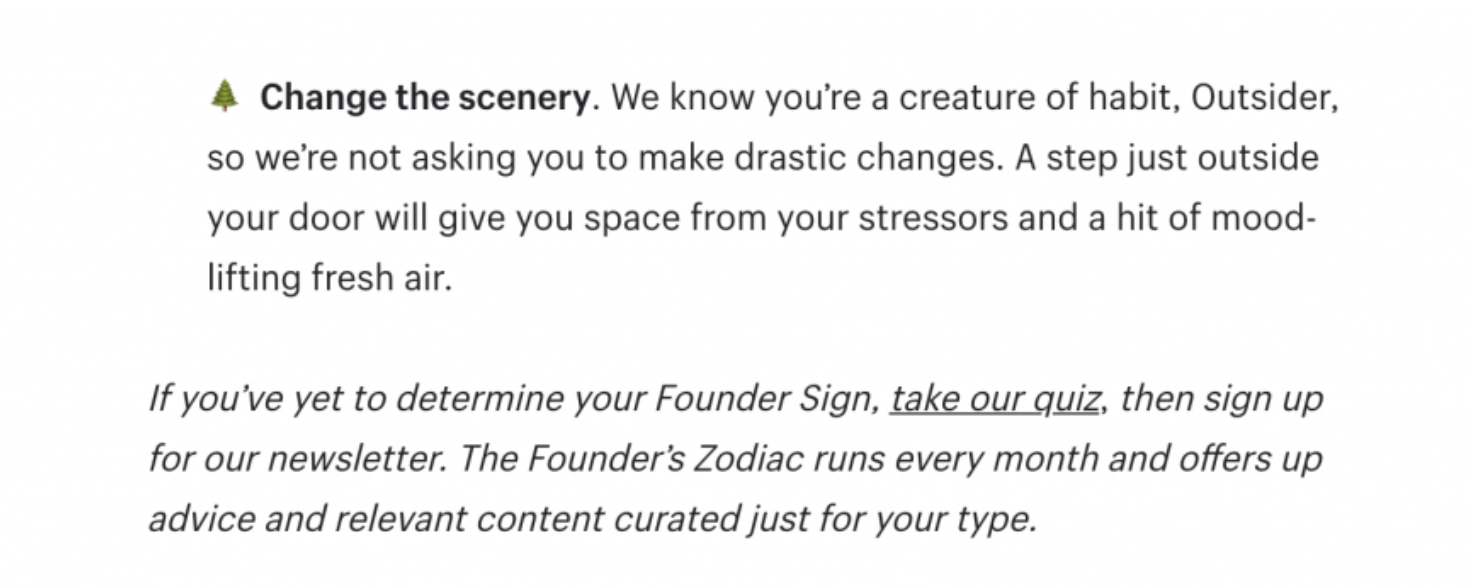
As an example, notice how this Shopify post includes an emoji and italicized text to specify the CTA is coming.

Example of a CTA asking to take their quiz
(Image Source)

Keep Multiple Devices in Mind

You never know whether your customers will see your content on their laptop, smartphone, or tablet. It’s essential you use responsive website design for your blog to accommodate each type of device.

Responsive design allows your blog to change appearance based on the parameters of any given screen. If you’re using a template to build your site, you’re in luck. Most reputable DIY site builders—think WordPress, Webflow, Shopify, and Squarespace—will do all the legwork for you when it comes to responsive design. Just make sure your content looks appealing in each view.

Make Navigation Simple

Your customers shouldn’t need a tutorial to navigate your website. They’ll expect to navigate your blog just like any other site they use.

Include an option to sift through the main types of content available at the top of the page. Alongside this navigation menu, a sidebar packed with related posts can also prove useful for a laptop or desktop view.

‍Show Users Related or Recent Content

Each blog post should point your customers to related, high-performing content. Whether you run a B2B, B2C, or lifestyle blog, the goal is to generate enough content that your users have all the information they could ask for.

Display this sort of content in a sidebar or at the bottom of each article. Feel free to link out to other relevant content beyond blog posts as well. For instance, if you have a podcast, point users to relevant episodes.

Make sure you don’t sacrifice the overall design just to cram in as much related content as possible though. A few articles should do the trick. Use internal linking to nudge users to check out more content.

Step 3: Integrate SEO Strategies

Believe it or not, blog design can actually help you improve your SEO. If you’re still unsure about whether or not your blog has SEO potential in the first place, we can help with that too!

Here’s how you can integrate the nuts and bolts of SEO without sacrificing one iota of aesthetic appeal.

Design With Efficiency in Mind

Your blog layout doesn’t have to be minimalist, but it should always be as devoid of clutter as possible. Cut anything you feel isn’t essential to the content or web design. This helps the page load faster and also keeps readers engaged.

If you load up your page with pop-ups, ads, and too much information in general, it’ll drag down your SEO ranking too. When you reduce everything to the bare essentials — without sacrificing aesthetic quality — you’ll have a better chance of climbing to the first page of a Google search.

Optimize Images Too

Optimizing images for your blog means choosing high-quality photos consistent with your blog layout. But did you know you can also optimize images for search?

Name each image in accordance with your keywords for any given page. Add in alt text to ensure there’s an even better chance to gain SEO traction. Not to mention, alt text is a must for accessibility too.

A picture is worth a thousand words in real life — and it can be worth quite a few for SEO too.

Use Headings to Break Up Content

Avoid walls of text at all costs in your blog posts. Break up your blog design with headers, sub-headers, and lists. Include plenty of photos beyond the header image for good measure too.

When you create these headings, make sure to keep your SEO keywords in mind. The more you can include in these section dividers, the better off you’ll be when it comes to ranking for search.

Pair Your Beautiful Blog Design With Our SEO Impact

Your blog layout and design is what hooks readers to stay on your page. The case studies and other in-depth content are what show them you can provide value. But in order for them to see your content, they need to know about your blog in the first place.

‍Contact us if you’re ready to pair great blog design with powerful search engine optimization. We can help you create the sort of content to keep customers clicking and converting.

You’ve created a thoughtful, search-optimized piece of content. Great! Now it’s time to start telling people about it. And to many digital marketers, climbing the search engine rankings feels like a continuous battle. One of the most effective weapons in this battle is backlink outreach or outreach link building. An effective link building strategy can make all the difference between online obscurity and visibility.

This guide will reveal the intricacies of backlink outreach and provide a step-by-step guide to securing high-quality links for your business.

What Is Backlink Outreach?

Backlink outreach refers to the process of contacting other websites to secure a link back to a page on your own website. These backlinks send digital signals to search engines that your site contains valuable information, which ultimately boosts your SEO ranking.

Backlink outreach is all about relationships. To succeed at backlink building, you need to develop and nurture connections with other websites in your niche. This involves careful planning, research, communication, and ultimately, trust.

P.S. If you’re a newbie to SEO link building, check out these 4 signs that you’re ready for SEO link building.

Why Backlinks Are Important for SEO

High-quality backlinks are the foundation of any good SEO strategy. They’re incredibly valuable for several reasons.

Backlinks Act as Recommendations

Think of backlinks as endorsements from other websites. Each link to your site acts as a vote of confidence, signaling to search engines that your content is trustworthy and valuable. The more quality backlinks you have, the higher your site’s credibility.

Backlinks Drive Organic Traffic

Backlinks play a pivotal role in driving organic traffic to your website. A backlink from a high-traffic website not only leads site visitors to your site (aka referral traffic), but search engines like Google also use backlines as a key factor in determining the relevance and quality of your site.

Boosting your credibility with Google can result in higher rankings on search engine results pages (SERPs), amplifying the amount of organic traffic your site receives.

Backlinks Increase Visibility and Page Indexing

If the increased organic traffic wasn’t enough of a perk, backlinks for reputable websites can also help search engines find and index your pages faster.

The faster a search engine can index your site, the quicker you’ll see pages start ranking for relevant search keywords, which also creates greater visibility for your business.

How to Identify Relevant Websites for Backlink Outreach

As in any relationship, choosing the right partner for your link building outreach is not a task that should be taken lightly.

Poor-quality backlinks from spammy or unrelated sites might even harm your SEO efforts, undoing hours of hard work and effort you put into creating quality content. Google can penalize your site if it’s linked from these dubious sources, so it’s best to stick with reputable ones.

Here are some things to consider when choosing a backlink partner.

Consider Your Industry/Niche

How well do you know your target audience? Consider which websites, bloggers, or influencers are their go-tos for information related to your niche.

These are the websites that are likely to drive traffic, because people are already interested in what you have to offer.

We recommend starting here because not only do they have a high level of reach and can drive amazing results for your business, but you can also use them as social proof later on when reaching out to other websites. Search engines will also prioritize backlinks from closely related sources, so shoot for the most well-known websites first and build from there.

Check Out Your Competitors

The backlink profiles of your competitors are a gold mine of valuable insights for SEO.

Tools like Ahrefs, Moz, and Semrush all have features that allow you to see who’s linking to your competitors. Take notes, because those are potential partners you’ll definitely want to target.

Assess Domain Authority

Domain authority is typically a score from 1 to 100 that predicts how well a website will rank on a SERP. It can be calculated using Ahrefs, Moz, or Semrush.

In your outreach process, focus on websites with strong DA, or 50 and above, as potential backlink partners. Higher DA sites tend to be more established and have greater authority, which means a backlink from them can be your ticket to climbing the SERPs faster.

Review Your Partner’s Backlink Policy

Many popular websites and blogs will explicitly mention their backlink policy on their website. And while many webpages welcome outreach, others may be more closed off.

It’s worth checking to see if any potential partner has a backlink policy on their site before reaching out, in case there are any specific protocols or details you need to be aware of.

5 Steps to Build Successful Backlink Relationships

Creating a robust backlink profile for your business isn’t just a game of numbers. It’s about cultivating intentional relationships with potential partners.

Here’s how to take a holistic, relationship-focused approach to your link building.

1. Determine Who You’ll Reach Out To

Before you even start your outreach, remember that there’s a real person on the other end. You’ll need to do a bit of detective work to figure out exactly who that person is and if they have the authority to approve your backlink request.

In the case of well-known bloggers or influencers, you’ll usually reach out to that individual directly. Other times, it’s not quite as obvious. Here are some steps to guide you in the case of the latter:

  • Author information: If the website primarily shares blog content, the author of a recent blog post is a great place to start.
  • LinkedIn: When it comes to finding a specific person or role within a company, LinkedIn is the best place to go. Searching for roles like Content Manager, SEO Specialist, Editor, or Webmaster will point you in the right direction.
  • Email lookup tools: Tools like Hunter.io or ZoomInfo are a sneaky way to find all the email addresses and job titles associated with a particular domain.
  • Contact Us or About Us pages: Sometimes, a simple visit to the website can give you all the clues you need. As a last resort, you can try a general contact email (e.g., [email protected]) or fill out the contact form to find the appropriate contact.

2. Engage With Their Content

A great place to start is to interact with your prospective link partner’s content.

This can be done in the blog comment section (if they have one), or on social media networks like Instagram, X, or LinkedIn.

You can even go so far as to send them a DM with a note of appreciation for a piece of content that deeply resonated with you. This establishes initial contact and puts you on their radar for when the time comes to send your outreach emails.

3. Get Personal

Most of us would agree that we prefer to associate with people, not faceless entities or machines. The same is true for link building.

Don’t shy away from showing off your personality in your outreach interactions. For example, you could establish initial contact by finding some common ground, such as a relevant topic in your industry or sharing an interest you know you both have in common.

Letting your personality shine through and showing off a more human side of your business goes a long way in any potential relationship.

4. Keep in Touch

Relationship-building is a long game. And just like all relationships in life, regular communication is key.

Meaningful interactions and engagements over time will trump bombarding people with emails any day of the week. For instance, you can reach out when the potential partner publishes an excellent blog post, achieves a significant career milestone (LinkedIn is great for this as well), or even on special occasions like birthdays and holidays.

5. Work With a Backlink Outreach Partner

Backlink outreach is a complex process that requires continuous effort. It takes patience and dedication, which can be time-consuming.

At MBE Group, we love to dig into where your value lies and turn that into backlink outreach campaigns that align with your goals. Our team are experts at securing high-quality backlinks and ultimately, more organic traffic for your business.

And we’ve got the numbers to back it up. Check out how we added 120K+ monthly organic sessions in only 10 months for our client with quality content and a link building campaign. Our client saw rapid growth of their site authority thanks in part to backlinking.

How to Craft Effective Backlink Outreach Emails

Cold outreach can be intimidating, but it’s a necessary part of any link building outreach.

Odds are that the bloggers or writers you’re contacting are probably busy people. Especially if they run a blog with a large following, you’ll only have limited time and word counts to pique their interest.

Your link building email should contain enough detail to explain why they should care, but keep it succinct to avoid losing them.

Here’s our recommended email flow to help you craft messages that will get more responses.

1. A Personalized Opening

The first few lines of your email are your chance to really hook your reader. Though it may only be a couple of sentences, it’s worth taking the time to make sure it’s unique and customized to them to grab their attention.

Consider how you would approach this person if you met them at a real-life event. How would you open the conversation?

Here are a few tips to help personalize your opening:

  • Use a compelling subject line: Before the blog owner even opens your email, they’ll make a snap judgment about it based on your subject line. A poorly crafted subject line can also trigger spam filters and result in your email being marked as spam, so proceed with caution. The best subject lines are short, to the point, and mention the name of the blog or website.
  • Address the recipient by name: If you can’t find their exact name, a simple “hi there” will work, but avoid things like “Hey Webmaster” or “Hi blog owner.” These greetings scream spam.
  • Mention or compliment their work: Be specific! Simply stating you’re a fan of their blog won’t do it. Instead, you can cite a recent blog post of theirs that resonated with you, a recent comment or social media post, or even find common ground by perusing their “about” page for their personal interests.
  • Use a professional email address: If you haven’t already, this is the time to retire your high school Hotmail address. A business domain is preferred and demonstrates that you’re a professional.

2. Clear Value Proposition

This is the most important part of your cold email — tell them why they should care about your content.

A good rule of thumb when reaching out to website owners and bloggers is to never assume that anyone owes you anything.

After all, those same bloggers are probably receiving all sorts of offers daily. Your job as an SEO marketer is to tell them why you deserve their attention and support.

Whether it’s guest posting or reciprocal links, show them how the relationship can be mutually beneficial.

This is a great point to pause and do a gut-check on your content. Be honest — does the content truly add value? Is it shareable and will the website owner or influencer’s audience gain value from it? If your content is similar or adds to one of their blog posts, use that to help support your case.

If not, it might be time to revisit your content strategy and see where you can make improvements.

3. Clear Call to Action

There’s nothing worse than receiving an email that boasts about how great a person’s work is, without getting to the root of what the sender actually wants.

The best way to cut through the noise is to clearly tell people what action you want them to take. Avoid sending the exact link in this initial email to avoid the blogger flagging the email as spam.

Here are some great examples of calls to action:

  • Sharing your content on their social media pages
  • Embedding a snippet from your content directly (this works best for infographics, videos, or social media posts like Tweets)
  • Posting your blog article as a guest post and linking back to the original
  • The blogger writing a follow-up or opinion piece on your content (more work on their part, but could be a great fit, depending on the blog topic)

The best part is that these options aren’t mutually exclusive. For instance, sharing the content on social media and posting the article as a guest post will build your authority and extend your reach much further than each action alone.

4. Sign Off With a Proper Email Signature

Your goal should always be to make the blog owner’s job as easy as possible. That starts with being able to contact you. Include your full name, job title, the URL of the blog or website you represent, your phone number, and links to your business’s social media accounts (where applicable).

5. Nail the Follow Up

Persistence pays! Sometimes a gentle reminder is all you need to secure a quality backlink.

Remember that high-ranking website owners and bloggers get inundated with requests constantly. It’s entirely possible that your initial outreach email may have been missed or overlooked in a crowded inbox.

By sending a follow-up, you increase the chances of your email being seen and responded to, and demonstrate that you’re genuinely interested in collaborating, not merely mass emailing for links.

Grow Faster With an Experienced Backlink Outreach Partner

Backlink outreach is so much more than just another SEO strategy. From the content you write to the relationships you build, every step should be executed with precision and purpose.

Sounds daunting? Don’t worry – MBE Group is here to help!

With years of outreach link building campaigns under our belt and a relentless focus on quality, MBE Group can take your SEO game to new heights.

Ready to elevate your backlink outreach without having to do the outreach yourself? Reach out to MBE Group and ask about our link building packages.

Search engine optimization (SEO) involves optimizing a lot of factors. From your site’s content to your presence on social media, there are so many things that affect your rankings.

But did you know that your website domain matters, too?

The backend setup of your site has a big impact on how search engines and users navigate the site—and that has a direct impact on your website rankings.

Some SEO pros believe subdomains are the way to go, while others say domains are your best bet. When it comes down to it, the best option depends on your situation.

Let’s look at the differences between subdomains vs. domains and how you can optimize both for a better user experience that boosts organic traffic.

Subdomain vs. Domain: What’s the Difference?

The biggest difference between subdomains vs. domains is the URL structure.

Your domain (which is also called a root domain, main domain, or top-level domain) is the unique address that identifies your website on the internet. For instance, www.example.com is a domain.

A subdomain is a second-level domain that belongs to your primary domain. Businesses usually use subdomains to navigate to different sections of a website. For example, shop.example.com would be a subdomain of the parent domain www.example.com.

The SEO Effects of Using a Subdomain vs. a Main Domain

Both subdomains and domains have a big impact on SEO.

Search engines look at your main site’s age to see how reputable you are. They usually give preference to sites that have been around for a while. Including keywords in your domain name can also help with search engine rankings because it makes it clear what your site is about.

Ranking a subdomain is similar to ranking your main domain. Search engines still care about the subdomain’s age, authority, keywords, and other ranking factors.

But in practice, a subdomain can have a big impact on SEO. Search engines treat subdomains as completely separate websites.

This means the SEO metrics of your main domain and your subdomains are totally separate. So, if you have a high-traffic subdomain with lots of backlinks, it won’t necessarily boost the SEO of your main domain.

Creating a subdomain is akin to creating a totally new website, SEO-wise, so you need to think carefully before creating a new domain.

Is a Subdomain a Separate Domain?

Technically, a subdomain isn’t a separate domain at all. It’s a separate section of your site that has its own URL.

But practically speaking? Yes, search engines view a subdomain as a completely separate entity.

Is It Better to Have a Subdomain or Domain?

There’s no right or wrong answer here. Both domains and subdomains have their pros and cons, so it’s up to you to determine which setup makes the most sense for your website.

It’s best to use a subdomain for:

  • Niche targeting: If you have a huge website or lots of products for different audiences, it can be a little overwhelming. Creating subdomains makes it possible to target different users with separate SEO strategies, keywords, and content marketing.
  • Localization: Many international companies will create subdomains to target certain geographic areas or users who speak a different language. This is helpful if you want to start ranking in local SEO searches.
  • Organization: If you have a gigantic site that’s hard to navigate, it could hurt the user experience and, as a result, your SEO. Using a subdomain makes your site architecture more navigable, which could reduce bounce rates and steadily improve SEO performance over time.

Subdomains definitely have their benefits, but they aren’t right for every business. It’s best to stick with a root domain for:

  • Brand consistency: If you want a single, unified brand experience, it’s best to keep everything on a single domain. It’s also best to use one domain if your web content speaks to just one type of user or buyer.
  • Domain authority: All of your backlinks go to a single URL with just one main domain. This makes it easier to build domain authority and potentially see SEO results more quickly than a subdomain.
  • Simpler SEO: From content creation to strategy, optimizing one site for SEO already requires a lot of work. Splitting domains creates more work for your team, so if you’re trying to do SEO with limited resources, stick with a root domain for now.

Optimizing Main Domains for SEO

Follow these quick tips to boost your main domain’s SEO rankings.

1. Create Content Consistently

Search engines want to send users to sites that regularly create quality content. Posting regularly on your company blog or social media pages will build up your reputation over time, so create new content on a consistent schedule.

If the very thought of that sounds overwhelming, we’ve got your back. MBE Group can create content for you that follows search engine guidelines, grows your site authority, and boosts conversions.

2. Optimize the Site Backend

Don’t overlook the power of optimizing the backend of your site. This includes optimizing metadata like:

  • Web page headers
  • Title tags
  • Image alt tags
  • Meta descriptions

This is easy to do on platforms like WordPress, but if you’re using a custom site setup, ask your webmaster for help.

As always, optimize your site for mobile users, check your site speed, and install an SSL certificate.

3. Use a Simple URL Structure

How easy is it for people to navigate your site? The cleaner and simpler your URL structure, the better. This is better not just for human users, but for search engine crawlers, too.

Revamping your site structure might take a little upfront work (and a lot of 301 redirects), but if it saves you the trouble of creating a subdomain, it’s worth it.

Optimizing Subdomains for SEO

Optimizing a subdomain is trickier because you’re optimizing two separate entities. Follow these tips to set up an SEO-friendly subdomain with less fuss.

1. Create a Unique SEO Strategy

Search engines consider your subdomain as a totally separate website, so you need a unique SEO strategy tailored to this subdomain. That includes:

  • Keyword strategies
  • Content creation
  • Linkbuilding strategies

You should have different goals for your subdomain, so set up Google Analytics and key metrics, too. This is the best way to understand whether your subdomain is helping or hurting your SEO efforts.

2. Boost Your Technical SEO

This is technically a different website, so whatever you do to maintain your root domain, do it for your subdomain, too. That might include virus scanning or regular speed tests.

It’s also a good idea to:

  • Use a new IP address: Work with your webmaster or web hosting company to move your subdomain to a separate IP address. This helps with website security and makes things a little bit easier to track on the analytics side.
  • Generate a sitemap: Create an XML sitemap for your new site and submit it to search engines. This could speed up how quickly your subdomain ranks in search.
  • Interlink subdomains: This helps share link juice as users navigate through the different areas of your website. Over time, search engines will see the relationship between separate subdomains, too.

3. Localize and Customize

A new subdomain gives you the freedom to be very specific and targeted. Instead of keeping things general, be very targeted in your language and offerings.

If you haven’t already, consider creating buyer personas for this subdomain. From there, create content that blends both your keyword strategy with your buyer persona pain points.

4. Keep the Branding Somewhat Consistent

Your subdomain operates separately from the root domain, but that doesn’t mean it should look separate. The last thing you want to do is spook visitors by taking them to a page that looks nothing like your main website.

Keep your subdomain branding elements consistent so users understand that this is still for the same company, just at a separate URL.

Dominate Google Search With the Right Domain Setup

In the showdown between subdomains vs. domains, there’s no clear winner. Ultimately, the best choice comes down to your SEO goals.

Subdomains give you an opportunity to target niche audiences, but they require extra management. Sometimes a well-optimized main domain can be enough to boost your SERP rankings over time.

Ultimately, whether you choose to use subdomains or stick to a single domain, it’s the quality of your content, the user experience, and your understanding of SEO best practices that will drive your website’s success.

You don’t have to do this alone, either. We know you’re busy, which is why MBE Group’s team of SEO experts is here to help. MBE Group creates your SEO strategy, manages it for you, and tracks your most important metrics to get you across the finish line, faster.

Ready to get started? Chat with MBE Group now to see if you should go with a subdomain vs. a domain.

Search engine optimization (SEO) is the backbone of digital marketing. Sure, you can pay for traffic to your site, but nothing beats the power of organic traffic earned by positioning your brand as an authority.

There are a lot of ways to do SEO, but the two most common are on-page and off-page SEO. Whether you’re a seasoned marketer or a total beginner, it’s important to understand how these strategies differ to boost your site’s visibility and ranking over time.

In this guide, we’ll explain the differences between on-page vs. off-page SEO, and how your business can leverage both to extend your online reach.

What Is On-Page SEO?

On-page SEO refers to all of the measures you take on your own website to boost your position in search engine rankings. This mostly comes down to optimizing user-facing content, but it also includes improving the HTML source code on your web pages.

On-page optimization includes a lot of factors, but these are the most common.

Keywords

With keyword research and optimization, you find the right keywords for your users’ search intent and strategically place them into your site’s web copy.

This not only helps search engines understand your content and rank it accordingly, but it also helps potential customers find content that solves their biggest pain points.

Meta Data Optimization

Meta data tells search engines what your site is about. Search engines then feature this information on the search engine results pages (SERPs) to attract users to your site. Optimize image alt text, title tags, and meta descriptions on every page to steadily boost inbound traffic to your site.

Page Content Optimization

Search engines favor unique content that solves users’ pain points. Instead of throwing together page copy that’s an obvious play at SEO, create copy for users first and optimize it for SEO after the fact.

Don’t forget to format the copy with plenty of headers, bullets, internal links, and images to engage your readers.

Many businesses want to create their own content, but this is usually easier said than done because it requires so much research. You have to find the right target keywords, generate topics your readers will love, and make your copy search engine-friendly, too.

When it comes to SEO content creation, it’s generally best to rely on SEO experts like MBE Group to create authority-boosting content at scale.

Page Speed and Mobile-Friendliness

Slow-loading sites have high bounce rates, which is bad for both human users and search engines.

With on-page SEO, you regularly check how your site renders on mobile devices. The goal is to quickly address problems before they affect the user experience or your website rank.

Core Web Vitals

Did you know that search engines like Google monitor your website performance? Search engines want to refer users to high-quality sites, so they carefully monitor how you treat search engine users. This is why metrics like engagement rates, page loading times, and time on page are some of the most important factors for search engine rankings.

What Is Off-Page SEO?

With off-page SEO, you improve your site’s reputation and trustworthiness by optimizing factors outside of your website.

You don’t have as much control over off-page SEO as you do with on-page SEO, but it can still make a difference in the rankings.

Off-page SEO covers a lot of territory, but these are the most common off-page SEO factors.

Backlinks

You earn a backlink any time another website links to yours. Quality trumps quantity with link-building, so the goal of off-page SEO is to generate as many high-quality backlinks as possible.

You can earn backlinks in so many ways, including:

  • Guest posting on relevant blogs, which you can source through networking or through cold outreach
  • Speaking as a podcast guest
  • Creating link-worthy website content or assets, like infographics
  • Doing content marketing collaborations with influencers or bloggers
  • Using a white hat linkbuilding service from an SEO agency like MBE Group

Social Media

It isn’t a major ranking factor, but search engines do look at your social media presence in the context of your search engine presence. Being active on social media platforms like Facebook, Instagram, Twitter, and LinkedIn (and even forums like Reddit) could give you a much-needed off-page SEO boost.

Local SEO

Search engines want proof that you’re legitimate, and local business listings offer a lot of legitimacy to your company. Listings via online directories like Google Business Profile (formerly Google My Business) and Yelp boost your visibility, especially in local search. This is ideal if you have a brick-and-mortar store, but investing in local SEO is still a great way to steadily boost your domain authority over time.

On-Page vs. Off-Page SEO

On-page and off-page SEO aren’t mutually exclusive. They work together to enhance your site’s authority and improve rankings. For example, you can’t earn backlinks (off-page SEO) if your landing page loads slowly (on-page SEO).

On-page and off-page SEO share several similarities, including:

  • Shared goals: Optimizing both on-page and off-page SEO will steadily boost your website’s search engine rankings. They both have the same goal, but they achieve that goal in different ways.
  • User focus: Both on-page and off-page SEO focus on enhancing the user experience. Whether it’s through providing high-quality content (on-page) or earning brand mentions from other sites (off-page), the end goal is to serve the people visiting your site.
  • Continuous improvements: You aren’t ever really “done” with on-page or off-page SEO. Search engine algorithms and user preferences change over time, so you need to stay on your toes to continue ranking well.
  • Keyword strategy: Both on-page and off-page SEO rely on keywords to boost rankings. On-page SEO does this directly through creating new content and optimizing meta data, while off-page SEO does this indirectly through guest post backlinks and anchor text.

But that’s where the similarities end. If you’re trying to understand the differences between on-page vs. off-page SEO, they differ in terms of:

  • Control: You have more control over on-page SEO. But with off-page SEO, you rely on other platforms and sites to contribute to your rankings. If someone decides to remove a backlink, there’s not much you can do about it.
  • Focus areas: On-page SEO focuses on website elements like your content, HTML structure, meta information, and page performance. Off-page SEO, on the other hand, focuses on external factors like backlinks, social signals, and local SEO.
  • Time to value: It’s never a guarantee, but on-page changes can lead to more immediate changes in your rankings. Off-page SEO strategies require building quality backlinks and a reputation, so it takes longer for your site’s ranking to reflect these improvements.
  • Execution: Both on-page and off-page SEO require a lot of work, but you execute them differently. You do on-page SEO by tweaking your web copy and back end source code. Off-page SEO happens outside of your website. There’s no coding required, thankfully, but you still need to invest in building relationships via social media marketing or guest blogging.

In the battle between on-page vs. off-page SEO, there’s no winner. Your business needs to use a combination of both strategies to see the biggest gains in search engine rankings over time.

Dominate Organic Search With the Right Marketing Strategy

On-page and off-page SEO work together to generate amazing results for your business. You won’t see results overnight, but with the right strategy, you’ll optimize both on-page and off-page ranking factors to come out ahead in the search engine game.

Implementing SEO best practices can feel overwhelming at first, but it’s a piece of cake if you break on-page and off-page SEO into actionable steps.

Or you could skip the line by outsourcing all of the hard work to MBE Group’s team of SEO experts. Contact MBE Group to create a unique SEO strategy for your business.

At some point or another, you’ve probably found yourself in the midst of a Google search that was going nowhere. No matter how many web results you clicked through, you just couldn’t find what you were searching for.

But then you see the perfect related search term under the “People Also Search For” section of Google. It refines your search, and you have your answer quickly. And now you’re down a little rabbit hole exploring the other topics it serves you based on your Google account habits.

Not only does this Google feature help users find exactly what they’re looking for, it also offers opportunities to discover related topics that might be of interest to them.

From a business perspective, People Also Search For is packed with SEO potential. When used strategically, these keywords can improve your brand’s online visibility and drive more organic traffic to your website, all without the cost of SEO tools.

Is your business using People Also Search For in your SEO content planning? If not, pour yourself a coffee, pull up a chair, and get comfortable, because we’re about to take a deep dive into the potential of this search feature for your business.

What Is People Also Search For?

People Also Search For (PASF for short) is a list of related keywords that is revealed after an initial search query is conducted.

This feature provides your business an opportunity to expand your online visibility and appear on more search engine results pages (SERPs for short).

Google rolled out the People Also Search For feature back in 2018 as a way to help users refine their searches in case they didn’t find what they were looking for. It’s also a handy little trick to discover related keywords that might be of interest to those same users.

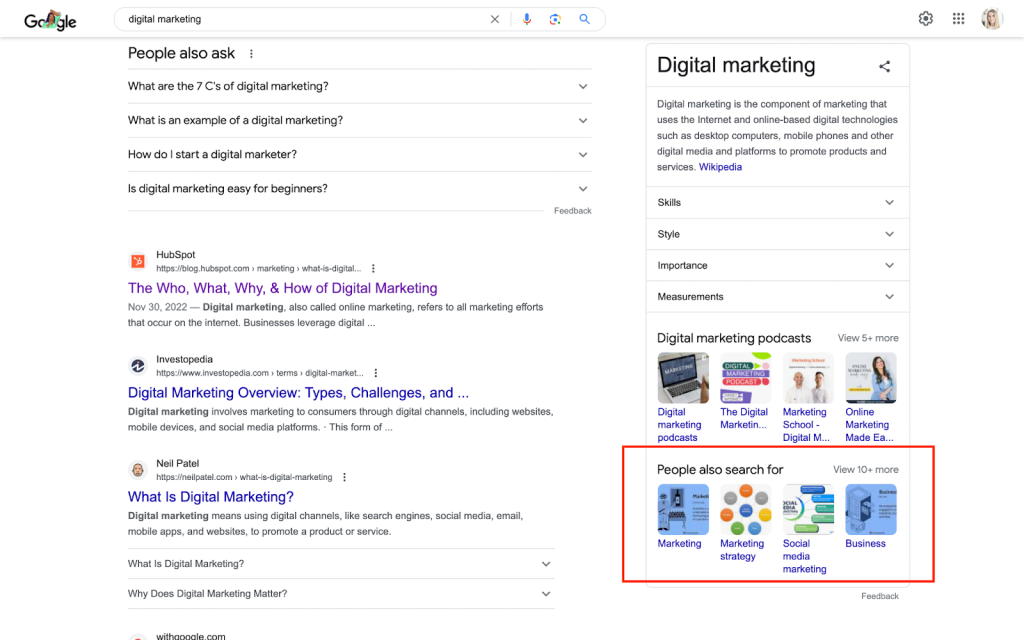
To reveal the People Also Search For results, all you have to do is run a search query on Google, then check the right side of the page. For most keywords, a box should appear with a definition, along with related resources and just below that, your People Also Search For keywords.

Example of the
Where to find the PASF box in Google search results

Where to find the PASF box in Google search results

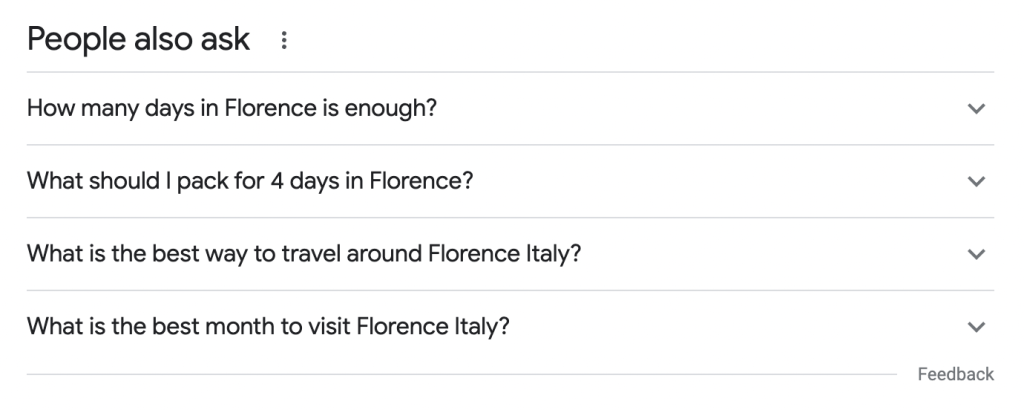
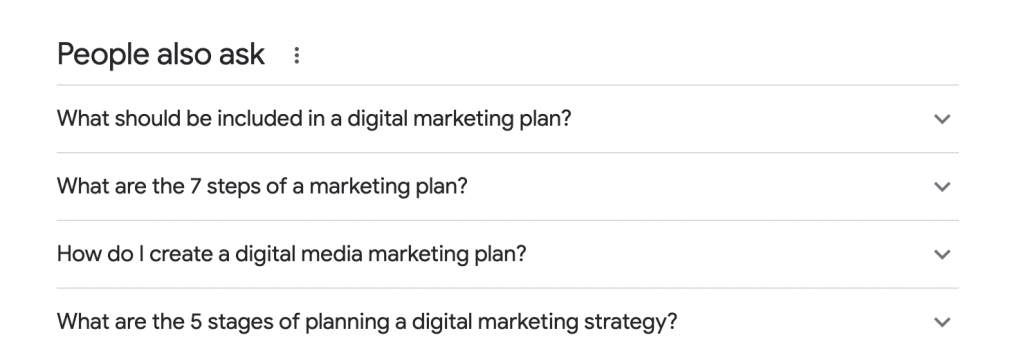
A quick note: PASF is not to be confused with “Related Searches,” which typically appear at the bottom of the page, and “People Also Ask” search queries, which can be found closer to the middle of the page. More on this below!

For example, a quick Google search of the phrase “digital marketing” will generate PASF results such as “marketing,” “marketing strategy,” and “social media marketing” to motivate searchers to explore related topics to learn about.

The main goal of PASF is to offer a glimpse into what a user might be interested in beyond their initial query. Oftentimes, the user might not even know they were looking for a content related to that topic until Google’s search algorithm serves it up to them on a silver platter.

PASF results aren’t random; they’re highly intentional and strategically chosen based on data that Google analyzes from past search behavior.

By determining which words or phrases users often search for in conjunction with the main query, Google can provide a better user experience and keep people using their platform longer. It also provides businesses with additional keywords to target in order to drive more traffic and leads. It’s a win-win.

The search feature that’s often mentioned when talking about PASF is Related Search Results. Both are powerful features provided by Google’s SERP, the key difference being that PASF focuses more on associated queries that expand user intent, while Related Searches offer alternative phrases/keywords to help refine users’ queries.

Developing an understanding of these features and how to incorporate them in your content planning will ensure that you’re covering your bases when it comes to understanding your audience’s search intent and increase your chances of being discovered by potential customers.

Understanding the Connection Between People Also Search For and SEO

When it comes to SEO, understanding search intent and how it impacts user behavior is critical.

Search intent refers to the underlying motivation or purpose driving a user’s search query. A search engine’s job is to then decipher that information and provide users with the most relevant and value-packed results for their needs.

While search intent may seem straightforward, it can actually take several different forms, depending where the user is at in their customer journey.

For example, people might search for a specific website or webpage directly. In this scenario, they might enter the business’s name into the Google search bar to reach their desired destination.

On the other hand, many people are still in the information-seeking phase. They might be looking for answers, explanations, or information about a particular topic or subject that they want to learn more about. This is where People Also Search For comes in.

By helping Google understand which keywords and topics are searched in addition to the main query, PASF improves Google’s outputs to help people find exactly what they’re looking for. This provides a better user experience, since people can be confident that they’ll find exactly what they’re looking for.

As a business, you can capitalize on this by making sure that you’re creating high-quality content that gives users exactly what they need. This keeps people coming back to Google time and time again, creating more opportunities for people to discover your content across a wide range of search queries.

How to Use People Also Search For In Your Keyword Research

People Also Search for is an SEO goldmine for businesses. Since the keywords the algorithm pulls are based on data directly from real world users, it’s a great way to ensure you’re creating content that is highly relevant to your topic or niche.

To save time and make the process easier, here are two tools to identify PASF keywords for your business.

Google’s SERP

To find the PASF keywords for a particular search query, simply search your desired keyword. Voila! The People Also Search For box should now appear on the side of the page, typically underneath a definition of the keyword and related content, such as podcasts or books.

As you can probably tell, this method can be time consuming if you plan to run it for multiple keywords. It also doesn’t give you any indicator of how difficult it is to rank for each of the PASF keywords listed. Instead, we recommend checking out the next tool on the list.

Keywords Everywhere

Google has a great free Chrome extension called Keywords Everywhere which shows you the PASF keywords for every query on its SERP. A content marketer’s dream, the tool allows you to quickly identify PASF keywords and incorporate them into your content strategy.

Keep in mind that since PASF keywords are based on what people are searching for in real time, they tend to have a high search volume. This means that while they have the potential to drive traffic to your site, they can also be more competitive to rank for.

By doing a bit of due diligence, you’ll be able to identify which keywords you should rank for and generate more traffic for your website. If you’re new to PASF, here are some quick tips to help you decide which keywords are worth targeting:

  1. Start with a general keyword that your business wants to rank higher for, such as “digital marketing.” A quick Google search of that keyword will reveal additional keyword ideas by triggering the PASF results.
  2. In a spreadsheet, create a list of PASF keywords that connect to your business and target audience. Returning to our digital marketing example, you might pull subtopics like “content marketing” or “content marketing strategy.” Keep in mind that there may be some repetition among PASF keywords, so continue clicking through search results and then back to Google until new ones appear, then add those to your list.
  3. Plug the keywords on your list into a tool like Ahrefs or another keyword research tool to analyze their search volume and ranking difficulty. If they have a solid search volume and are worth targeting, put them into a separate column for future content ideas.

Using PASF Keywords for Better Content Planning

Once you’ve got a handful of PASF keywords that you want to rank for, it’s time to put those keywords to work by turning them into long-form, valuable content for your audience.

Here are a few of the ways that PASF can make your content planning more seamless.

1. Find Blog Topic Ideas

It’s no secret that long-form content is one of the best ways to build a loyal following. People Also Search For is a great starting point for your long-form content planning, as it helps you understand your audience’s search intent better and create content around topics they’re actually searching for.

And while People Also Search For is a great starting point for your audience research, Google offers another tool called People Also Ask that can help you nail down your blog content even further.

Similarly to PASF, People Also Ask typically provides long-tail keywords in the form of popular questions users are searching for. For example, if we search “travel tips for Florence,” Google offers the following long-tail keywords in the People Also Ask section:

People also search for: Example of the

That’s four new blog post ideas, minimal effort required. By creating blog content and helpful guides that provide answers to these questions, you can easily build your site’s authority and boost your search rankings.

Or if you’re looking to simplify your content ideation process, you can always opt to work with an SEO-focused content partner that will conduct PASF keyword research on your behalf.

MBE Group’s content process includes planning, producing, and publishing keyword-optimized blog articles (including PASF keywords) that help your site rank on Google for concepts that are most important to your business. Learn more about our content services to see if we’re the right fit for your business goals.

2. Check Out What the Competition Is Writing About

People Also Search For is a great starting point for keyword research. But beyond that, it can help uncover additional content ideas by offering a glimpse into what topics your competitors are targeting.

Start by investigating which brands are at the top of the SERPs for each PASF keyword you want to target. See what topics these businesses are writing about, then analyze their content closely, including headlines, subheadings, and what information they’re putting out in order to secure that top search spot.

For example, let’s say your business sells dental software. It would be great to be the #1 spot for the search term ”how to choose dental software.” The top result at the time of this writing is a blog article titled “5 Things to Look For In Dental Practice Management Software.”

By creating useful guides or long-form blog content with 7 or 10 things to look for, along with sections the top article doesn’t have, you’ll be able to add more value to your audience and potentially even knock competitors out of that top search spot.

PASF keywords are a great starting point for competitor analysis, but we highly recommend checking out 6 SEO tools that the pros use for competitor analysis if you really want to give your business an edge.

3. Use PASF as a Starting Point for FAQs

One of the most underrated SEO strategies is using PASF results to inform the FAQs section on your website. Since these keywords are relevant and have a high search volume, it’s a strategic way to optimize your content for search, as well as speak directly to your target customers’ needs.

Here’s how to do it: Start with visiting the search results page for each of your PASF keywords. Next, check out the People Also Ask section of each page to identify popular search queries related to your business or niche. Lastly, develop detailed and informative answers for each question, making sure to incorporate the answers naturally (it should never feel forced).

For example, clicking on the PASF keyword “social media marketing” generates the following related search queries:

An screenshot of Google's

Providing comprehensive answers to these questions not only improves your website’s overall user experience, it pulls in people with similar interests who may not be familiar with your business.

Craft thoughtful answers to what customers are asking in real time so that you’re more likely to be viewed as an authority on the subject. This in turn builds trust and encourages more people to buy from you.

4. Use PASF to Improve On-Page SEO

Last but certainly not least, PASF is a great way to improve your on-page SEO, a key factor in determining your search rankings.

Once you’ve identified which PASF keywords are relevant to your business, Incorporate them naturally (key word being naturally) into your headings, meta descriptions, and page titles. You can also include them in your blog titles and throughout your blog posts.

By utilizing these terms in your webpage content, you help search engines like Google understand your business better. And Google will in turn reward you with higher search rankings and greater visibility.

Save Time on Content Planning With a Trusted SEO Partner

If you’re looking to harness the power of People Also Search For to enhance your online visibility, MBE Group is here to help.

Our team of experienced content strategists are pros when it comes to selecting top-performing PASF keywords and incorporating them seamlessly into your content. By using these keywords to attract more traffic from relevant search queries, we’ll help you create more targeted content that will send your search rankings soaring.

Contact us today to learn more about how we can expand your digital presence and drive targeted traffic for your business.

Are you investing in content marketing for search engine optimization (SEO)? You’re putting in a lot of hard work to dominate the search engine results pages (SERPs), but quality content alone might not get you to the top of the search engines.

You also need to outdo the efforts of your competitors. That’s why every digital marketing strategy needs to include an SEO competitor analysis. Not only will you better understand your competition, but you’ll also get a better idea of their SEO strategies — and gaps in their target keywords, content topics, and more that you can take advantage of.

It’s hard to manage SEO manually, which is why so many companies use a mix of SEO tools to check their competitors’ websites. Let’s look at why SEO tools are so helpful for checking your competitors’ content, plus the six best tools for the job.

Why Do I Need SEO Tools for Competitor Analysis?

SEO can’t happen in a vacuum. You need a solid understanding of your competitors’ keywords, backlinks, content, and more to inform your own SEO strategy.

Sure, SEO tools usually require an investment, but it’s well worth the money. Businesses that use SEO competitor analysis tools are able to:

  • Create better content: Look at your competitor’s content to see what they’re doing well. Whether you want to do content marketing optimization or create new content, competitor analysis tools will help you learn how to create high-ranking content that your audience wants to read.
  • Target top keywords: SEO can feel like a never-ending quest to find the right keyword opportunities. But a quality keyword research tool will help you spot organic keywords with the right mix of search volume and competition to boost your content performance. Some tools will even help you track your keyword rankings over time.
  • Improve their search rankings: If you want the best SEO strategy for your business, you can’t ignore what other companies are doing. When you write better content tailored to the expectations of both people and search engines, you’ll steadily start to increase your domain authority and rankings over time.

The 6 Best SEO Tools for Competitor Analysis

SEO is complex, and competitor analysis isn’t easy, either. The good news is that you don’t have to do any of this manually. These six SEO research tools will help you learn everything there is to know about your competitors and dominate Google search.

1. Semrush

Helpful features:

  • Keyword gap analysis
  • Backlink analytics
  • Keyword metrics reports

Semrush helps businesses optimize their search engine marketing (SEM), which also includes SEO. This is a powerful tool with a lot of functionalities, so you can also use Semrush for PPC, social media, and (of course) competitor research. Just enter your competitor’s domain and Semrush will do the legwork for you.

Use the Semrush Competitor Analysis Tool to:

  • View your competitor’s organic search and paid traffic performance.
  • Compare as many as five competitors side-by-side to find gaps in their keyword strategies.
  • Look at a single keyword’s metrics.
  • View your competitor’s backlinks, referring domains, and more.
  • Track your own performance in the SERPs.

If you’re looking for a tool that gives you more for the money, Semrush also has features for content planning, market research, advertising, and social media.

2. SpyFu

Helpful features:

  • Website domain comparison
  • Historical SERP tracking
  • Traffic analysis

SpyFu started out as a research tool primarily for PPC ads, but you can also use it for SEO. Simply enter your competitor’s websites into SpyFu to see backlink information, keyword rankings, and historical performance data.

SpyFu really shines with its historical information, which gives you in-depth insights into Google Ads and organic rankings for the past 16 years. If you want to see how your competitors changed their PPC or SEO game over time, SpyFu is a must.

SpyFu also allows you to compare multiple website domains at once, which makes it easy to pit your competitors against each other. But because SpyFu leans heavily on the PPC side, this tool is best suited for businesses that also run paid ads alongside organic SEO campaigns.

3. Ahrefs

Helpful features:

  • All-in-one SEO metrics dashboard
  • Backlink analysis
  • Webpage backlink and social share tracking

Ahrefs is one of the most trusted SEO tools on the market. In fact, MBE Group uses Ahrefs for our own website and for our clients!

Use the Ahrefs Site Explorer tool to view your competitor’s backlink profile. You’ll also see their website’s organic traffic information, as well as data on their paid traffic.

Ahrefs boasts the fastest backlink crawler in the industry, so if you’re trying to boost your backlink research for linkbuilding, this is a solid tool for the job. Ahrefs also allows you to monitor the number of backlinks and social shares associated with your competitors’ top pages.

If you want insights into your own website’s performance, Ahrefs offers a free site audit. Just enter your domain name and start the audit to see both technical and on-page SEO performance recommendations. Best of all, this audit is free if you connect Ahrefs to Google Search Console.

4. Moz

Helpful features:

  • Custom suggestions for page optimizations
  • Backlink opportunity identification
  • Competitor website audits

Pricing: $14 to $720 a month

Moz offers both free and paid SEO tools for competitor analysis, so it’s accessible to both startups and enterprise businesses.

On the free side, its Competitive Research checker gives you a free analysis of your top SERP competitors. This can help you:

  • Find your competitors’ top pieces of content
  • Check competitors’ site metrics
  • Identify your competitors’ keyword gaps

You’re limited to just three reports a day, though, so make them count.

If you want to get more out of this platform, Moz Pro is a solid place to start. It allows you to target specific keywords, pull accurate keyword volumes, and check difficulty metrics to find low-hanging fruit for your keyword strategy. You can also track your own webpage rankings and keywords — as well as your competitors’.

5. Similarweb

Helpful features:

  • Competitor performance leaderboard
  • Timely trend-spotting
  • Custom SEO performance suggestions

Similarweb offers a free tool on its homepage for competitor research. Just add your competitor’s URL and it will generate a high-level report. Similarweb allows you to look up websites, Android apps, or iOS apps, so it’s ideal for SaaS businesses. The free tool will show your competitor’s ranking, bounce rate, visit duration, and much more.

The free report is a good place to start, but it probably won’t have enough substance to it to help you build a better digital marketing strategy. Try Similarweb’s paid Digital Marketing Intelligence SEO tool for competitor analysis.

In addition to competitive analysis, it also displays keyword, PPC, and affiliate data. If you’re trying to roll out an affiliate marketing strategy, Similarweb can help you see exactly what the competition is up to.

Similarweb’s competitive analysis tool gathers a lot of data and makes suggestions for you. Scrappy SEO and marketing departments use this to quickly identify opportunities without sifting through data manually. Best of all, it provides solid industry benchmarks to help you understand your performance.

6. iSpionage

Helpful features:

  • Automatically identify top competitors
  • Proprietary Keyword Effectiveness Index (KEI)
  • Ad Effectiveness Index (AEI)

Its name might sound like a cloak-and-dagger film noir, but iSpionage is a solid SEO tool for competitor analysis. Just visit its homepage and enter your competitor’s URL to “start spying” (their words, not ours).

You’ll need to create a free account to view the data, but iSpionage will provide high-level information on your competitors’ PPC and organic keywords, as well as their top-performing paid ads.

Their AdWords Competitor Keyword Tool is ideal for paid ads, but you can use it for SEO, too. If you don’t know who your competitors are, iSpionage will suggest a few to start. It displays 7 years’ worth of PPC and SEO keyword data for your competitors. Check their organic search traffic values, the number of first page organic keywords, and much more.

Competitive Analysis Tools Are Great — But They Only Get You So Far

While it’s important to stay in your own lane, businesses still need to keep a careful eye on what their competitors are doing. This way, you can write competitive content that stands out both to your audience and to search engines.

The good news is that you don’t have to analyze your competition manually. These SEO tools for competitor analysis can handle the heavy lifting:

  1. Semrush
  2. SpyFu
  3. Ahrefs
  4. Moz
  5. Similarweb
  6. iSpionage

But tools alone will only get you so far. What do you do next?

That’s where we come in. MBE Group’s team of SEO experts can assist you with everything from content strategy to results tracking. We’ll make your brand shine and help you beat out other brands on the SERPs.

Ready to overhaul your SEO? Chat with MBE Group now to outdo your competition.

Whether you’re an enterprise or a small business, you need a good website to reel in potential customers. It might sound simple, but designing web pages that please human users and search engines isn’t always a walk in the park. You need to make your website visually appealing, functional, and optimized for search.

That’s a lot to juggle, which is why so many businesses follow website design best practices. These best practices give you a template to work from so you can simplify the normally complex process of website design.

Check out this guide to learn why web design is so important, as well as five proven website design best practices to revamp your website.

Why Does Web Design Matter?

Your website should change as your market, business, or target audience change. Instead of designing a website based on design trends or your gut, you need to follow proven website design best practices that turn heads — for the right reasons.

Done well, web design can help businesses:

  • Improve accessibility: Over 61 million U.S. adults have disabilities. Nearly 5% of U.S. adults are blind or have serious difficulty seeing. Following proper website design best practices can help you give these users equal access to your website content. That’s not only the right (and legal) thing to do, but it could also boost website traffic. It’s a win-win.
  • Enhance the user experience: Whether you have an e-commerce website or run a company blog, web design can help you increase the amount of time people spend on-site. The better their experience, the better your conversions will be.
  • Rank better in search engines: Search engine optimization (SEO) gives businesses the ultimate edge in organic search. But did you know that search engine crawlers care about the user experience? By making your website easier to navigate, you could improve your ranking in the search engine results pages (SERPs) over time.
  • Protect their brand identity: Web design is equal parts technique and design. If you want to promote your business as a quality brand in your space, website design best practices can help your website stand out.

5 Website Design Best Practices for Your Company Website

Trends come and go in web design, but best practices never go out of style. Whether you’re building a new website from scratch or you just want to refresh an existing site, follow these five best practices to get more results.

1. Create a Responsive Website

Screenshot of Yelp's website on a mobile device
Yelp’s site scales down to mobile beautifully, offering a distinct look from their desktop browser layout.

Does your website use responsive design? A responsive website adapts to different screen sizes, which gives website visitors the same experience on desktops, tablets, and mobile devices.

Most website templates use responsive design already, but it’s still good to check if yours is responsive. Even if you use responsive design, you might find that certain elements, like images or videos, don’t shrink or enlarge to the correct size. You might need to work with a web designer or developer to create a responsive site that creates a seamless user experience.

2. Include the Right Design Elements

Web design best practices: Image of Native Pet's website from a computer
Native Pet’s use of white space and eye-catching colors make it a delight to browse their products.

Your website’s design and layout need to make a good first impression. But when it comes to web design, less is more. Businesses need to work with a web designer to balance simplicity with usefulness and function.

Keep your website design clean and simple to avoid overwhelming your visitors. Just make sure it includes these design elements:

  • Visual hierarchy: Arrange all visual elements on a web page in order of importance. This might mean adding a navigation menu in the top left corner or dropping a header image above the fold. Work with your team through the design process to ensure the most important information is near the top, so users don’t have to scroll to see it.
  • Social media links: Don’t forget to link to your social media profiles. Add buttons to your website footer linking out to your Twitter, Facebook, LinkedIn, or Instagram to engage with website visitors after they leave your site.
  • White space: Negative space is a must-have for any website. This website design best practice will make your site look clean and clutter-free.
  • Consistent branding: It needs to be obvious that users are visiting your company’s website. Ensure that you use consistent branding, which includes your logo, color scheme, and fonts, on every page.
  • Clever typography: Use on-brand typography across your website, but don’t let your design get in the way of readability. Most websites opt for sans serif fonts that are easy to read, like Arial or Helvetica. Save the fancy, less-readable fonts for headers, logos, or callouts.

3. Test Your Website Functionality

Website Design best practices: Greenvelope's homepage
Digital invite site Greenvelope has stunningly simple navigation: just two options!

While website design largely focuses on the front end of a website, we can’t overlook how important it is to have a solid technical foundation for your site, too. After all, a pretty site isn’t much good if it’s slow or unusable.

Functionality and usability are crucial components of website design. Ensure that your website loads quickly, has a clear navigation menu, and is easy to use on both desktop and mobile devices. Make sure your search bar is easy to find, and your call-to-action (CTA) buttons are clear and concise.

If you want to go the extra mile, work with a web developer to:

  • Optimize your code: Clean up your HTML, CSS, and JavaScript to improve your website load time. Use minification tools to compress your code and eliminate any unnecessary characters, comments, or spaces.
  • Simplify your main navigation: Make sure your navigation bar is easy to use and doesn’t have too many options. Try to limit it to no more than seven items.
  • Check your homepage: Your homepage is the first thing people see when they land on your website. Make sure it’s easy to navigate, and that there aren’t any broken links or images.
  • Use breadcrumbs: Breadcrumbs are a navigational aid that helps users understand where they are on your website. They’re particularly useful for large websites with lots of pages.

4. Optimize for SEO and Accessibility

Image of The BACH's homepage featuring their top destinations
The BACH nailed local SEO with their “Top Destinations” landing pages for city-specific bachelorette party planning.

While there are plenty of ways to drive traffic to your website, SEO optimization is the best, low-cost way to generate traffic.

Through the power of optimized headings, high-quality copy, and consistent posting, content marketing agencies like MBE Group make it possible for businesses to boost traffic with less effort.

By the way, SEO and accessibility work hand-in-hand. Search engine crawlers use the same back-end data as users with disabilities, so optimizing your site for screen readers can help you rank better in search engines, too. This isn’t an exhaustive list, but you can make your site more accessible by:

  • Structuring content with H2 headers
  • Following proper website architecture rules
  • Including relevant alt text on all images
  • Providing captions or transcriptions for video or audio content

5. Do A/B Testing

Example of Unbounce using A/B testing to promote their course
After A/B testing their CTA button, Unbounce went with an email capture instead of this tweet option and increased their conversions by 24%.

A/B testing, which is also called split testing, compares two versions of the same web page to see which option performs better. If you want to boost website conversion rates, regular A/B testing is a must.

The key is to change just one variable at a time, so you know what works. For example, you can take your existing landing pages and see whether a call to action (CTA) button performs better when it’s green or red.

This website design best practice is better suited for existing websites that need to boost performance. With regular testing, you can see which of your existing web pages are effective, which should inform your other aspects of your web design.

Unlock Your Website’s Potential With Proven Web Design Best Practices

There’s no such thing as a perfect website. Your customers’ preferences will change, so it’s a good idea to keep updating your website to give your audience exactly what they want.

Website design best practices can improve your website’s user experience, but don’t stop there. Regularly create high-quality content that gives your site visitors something to talk about.

When it’s time to fill that website with SEO-focused blog posts, reach out to MBE Group to create and execute a content marketing strategy that can help you win more customers.

Do you have a project you need support with? Let's chat.

Get In Touch

ABOUT MBE GROUP

With 40+ years in mobility, tech and consumer goods, we build brands and solve tough challenges through smarter strategies, seamless design and solutions that scale.

SUBSCRIBE TO E-NEWSLETTER

    Built with Kit

    Office

    1441 West Long Lake Rd.
    Suite 330
    Troy, MI 48098

    Do you have a project you need support with?
    Let's chat.

    Get In Touch

    ABOUT MBE GROUP

    With 40+ years in mobility, tech and consumer goods, we build brands and solve tough challenges through smarter strategies, seamless design and solutions that scale.

    SUBSCRIBE TO E-NEWSLETTER

      Built with Kit

      DETROIT HQ

      1441 West Long Lake Rd.
      Suite 330
      Troy, MI 48098

      Copyright ©2026 MBE Group. All rights reserved.

      Privacy Policy

      Copyright ©2026 MBE Group.
      All rights reserved.
      Privacy Policy